Resumen 2023
El 2023 comenzó con una sensación de renovación y optimismo. Tras un período marcado por la pandemia, este año se presentó como un lienzo en blanco, lleno de posibilidades y nuevas experiencias. Aunque el COVID-19 ya no domina nuestras vidas como antes, su impacto sigue siendo palpable en cómo vemos el mundo y en cómo nos relacionamos los unos con los otros. Este año ha sido un viaje de redescubrimiento, desde encuentros más íntimos y significativos hasta eventos más grandes y festivos. Hemos pasado de una realidad de restricciones y cautela a una de mayor libertad y celebración. Y, al igual que el año pasado, este 2023 ha estado lleno de momentos memorables, como la fiesta de fin de años en Agres, que han marcado un regreso a las tradiciones y alegrías que tanto extrañábamos. Compartiendo estos momentos con seres queridos, como Xavi y su familia, he redescubierto el valor de la conexión humana y la alegría de estar juntos.
Aprendizajes
En este 2023, he acumulado una serie de lecciones que, en mi opinión, resumen los aspectos más esenciales que la vida me ha enseñado este año. No me detendré a analizar la diferencia entre aprender e interiorizar, aunque es un tema fascinante. Sin embargo, quiero destacar que el proceso de aprender, y más aún el de re-aprender, es una constante en la vida. A menudo, nos encontramos con lecciones que necesitamos experimentar varias veces antes de que realmente se asienten en nuestra comprensión y comportamiento. A continuación, comparto las lecciones más significativas que he aprendido este año, las cuales han requerido tiempo y reflexión para integrarlas plenamente en mi vida.
- He desarrollado una mayor conciencia de mis limitaciones personales en cuanto a la concentración y el tiempo necesario para absorber e interiorizar información clave. Al adentrarme en el mundo del trading, esta experiencia me ha obligado a ser aún más disciplinado con mi tiempo y energía, enseñándome a valorar cada momento y a utilizarlo sabiamente. A su vez, he comprendido que existe un delicado equilibrio entre el tiempo que se necesita para aprender y el tiempo para ejecutar. Esta comprensión ha sido crucial para planificar mejor mis proyectos y tareas, asegurándome de dedicar suficiente tiempo tanto a la fase de aprendizaje como a la acción necesaria para alcanzar mis objetivos.
- Delegar Trabajo a los Estudiantes. He aprendido la importancia de dejar que los estudiantes trabajen de manera independiente. Me di cuenta de que, al soltar las riendas, ellos pueden sorprenderte con su capacidad de resolver problemas y su creatividad. Este enfoque no solo les beneficia a ellos en su aprendizaje, sino que también me ha permitido enfocarme en otros aspectos cruciales de mi labor educativa.
- He tomado conciencia de la importancia de una alimentación saludable y el autocuidado, aunque aún estoy lejos de lograrlo plenamente. Este año, he aprendido profundamente que sin salud no hay nada; es nuestro bien más preciado. A pesar de no haber alcanzado aún mis objetivos en este aspecto, reconozco que el cuidado de la salud es fundamental y estoy comprometido a trabajar hacia un bienestar físico y mental más sólido.
Proyectos y marca personal
El único libro no técnico que he tenido la oportunidad de leer este año ha sido “Manifest per als herois de cada dia” de Robin Sharma. Como suele suceder con este autor, el libro me ha llevado a reflexionar y trabajar en aspectos personales profundos, recordándome la importancia de centrarse en lo que realmente importa en la vida. Todavía recuerdo esos días de verano en la playa disfrutando de la compañía de este gran libro.l
En el ámbito más cercano a lo profesional, quiero destacar “Industria 4.0, la transformación digital en la industria” de Jaume Martínez Aguiló. Tuve el placer de almorzar con él y recibir una dedicatoria en su libro. Leer a alguien con una perspectiva de diferente sobre temas que domino siempre es una oportunidad para replantear mi comprensión y, aunque en ocasiones no comparta completamente su visión, su libro ha sido una fuente valiosa de conocimiento. Muy interesante poder ver la Industria 4.0 des de la óptica de un director financiero.
Por otro lado, debido a la carga de trabajo hacia finales de año, he tenido que reducir mi actividad en redes sociales y en mi marca personal oriolrius.me. Simplemente, no he podido manejar el volumen de trabajo que tenía. Suerte de la ayuda de Fátima y la paciencia de mi familia.
Sin embargo, el proyecto que llevo adelante como hobby, de carácter más técnico y que me permite profundizar en temas de dudosa rentabilidad, sigue creciendo poco a poco. Me refiero a Industry 4.0 systems, un proyecto que me apasiona y en el que invierto mi tiempo libre.
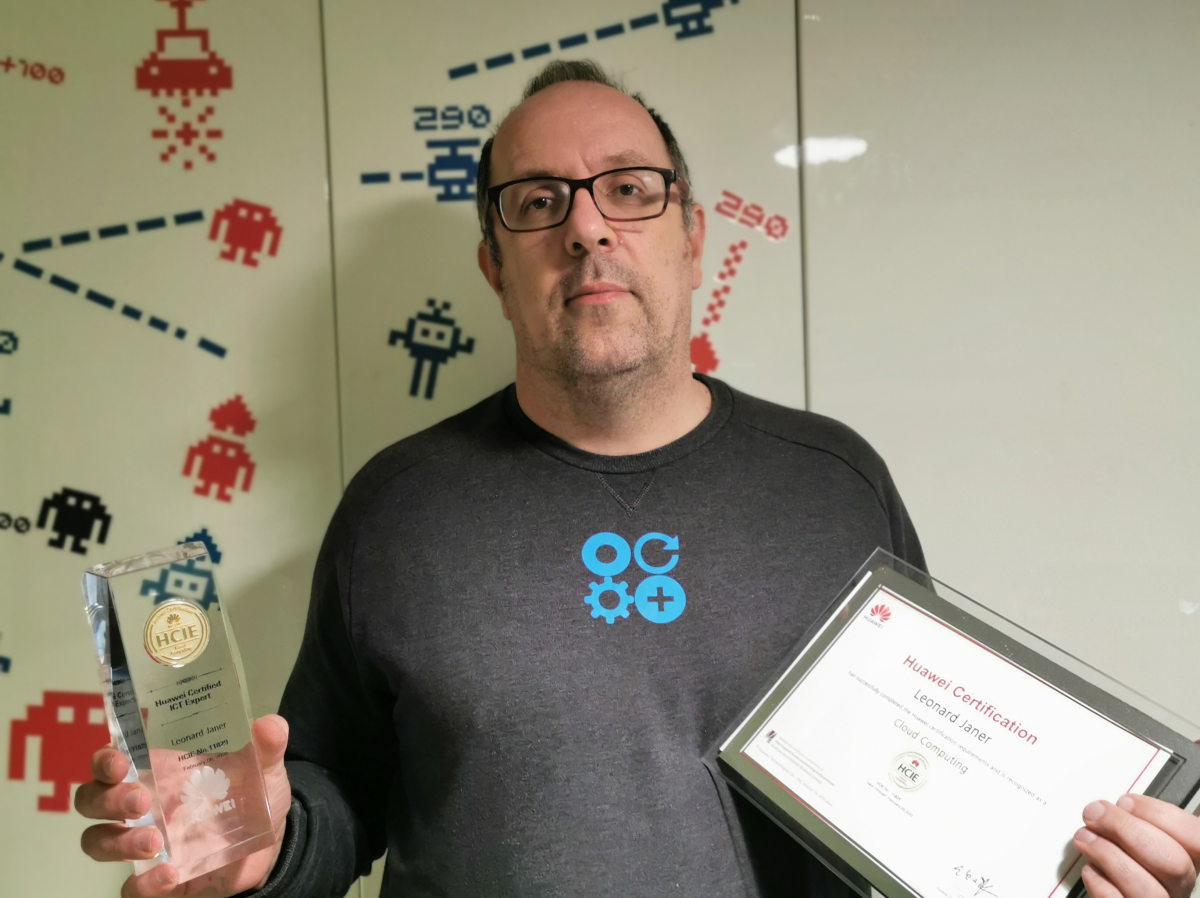
Finalmente, este año ha estado marcado por una pérdida muy significativa. El adiós a Leonard Janer, una figura y mentor fundamental en mi vida. Fue una excelente persona, un profesor incomparable, un técnico apasionado y un amigo inigualable. Su partida ha dejado un vacío irremplazable, y siempre estaré agradecido por todo lo que me enseñó y compartió conmigo. GRACIAS POR TODO, LEONARD.
Familia y temas personales
El año ha estado marcado por un proyecto que nos ha mantenido muy ocupados: la reforma de la cocina y el comedor. Tomamos la decisión de unir ambos espacios, creando un único y acogedor lugar en nuestro hogar. Desde el primer día del año, nos hemos sumergido en un torbellino de planificación, diseño, selección de materiales, toma de decisiones, contrataciones y revisiones.
Ha sido un proceso intenso, lleno de detalles y decisiones importantes. Durante los meses de obras, nuestro refugio fue el apartamento en la playa. Aquí, las visitas a restaurantes se convirtieron en algo frecuente, tanto que terminamos haciéndonos socios del Club Marítimo de Cubelles. Esto no solo nos benefició con descuentos, sino que también abrió una nueva puerta para Roc, quien comenzó su aventura en el mundo de la vela.
Para seguir hablemos un poco de los viajes que hemos podido disfrutar este año.
En enero, nos aventuramos a Gran Canaria para visitar a la familia de Oriol y Gemma. Nos maravillamos con lugares inesperados en Canarias. Nunca imaginamos que había zonas húmedas y montañosas; como Teror y Artenara, donde Oriol tiene la base.

En Semana Santa, vivimos la magia de Eurodisney, una experiencia inolvidable llena de diversión y fantasía. Realmente fue un viaje que me sorprendió muy positivamente. Más allá de las atracciones, todo el montaje y la logística que supone un parque de atracciones como este es algo deslumbrante. Además, ver a toda la familia disfrutar el sueño de vivir momentos mágicos juntos, no tiene precio.

En el puente de la purísima, viajamos al sur de Francia con los cuñados viendo varios mercados navideños, sumergiéndonos en un ambiente navideño y lleno de tradición. Concretamente visitamos: Peyriac-de-Mer, Barcares, Perpignan, Carcasonne, Narbona, Beziers y Collioure. Itensidad a tope y rincones preciosos en cuatro días para entrar en las fiestas navideñas por todo lo alto.

Y en cuanto al hockey, tanto Roc como Nil siguen con una motivación desbordante. Este año, junto con otros padres, nos involucramos más en la junta del club C.E. Torrelavit para preservar el hockey patines, una actividad que podría haber desaparecido. Fue un esfuerzo que valió la pena, ya que el equipo ha tenido una temporada excepcional, terminando invictos y en primera posición en la primera parte de la liga. Ha sido un año de desafíos, pero también de grandes satisfacciones y nuevos descubrimientos.
Charlas y escuelas de negocios
Este año también tuve el honor de participar en el podcast de Walker Reynolds, un referente en Industria 4.0, gracias a la intervención de Marc Pous. Poder compartir en este espacio ha sido una experiencia enriquecedora y una oportunidad para profundizar en temas que me apasionan.
Este ha sido mi segundo año como profesor en ESADE, he continuado impartiendo clases en las asignaturas de Digital Technology, Digital LABs y Capstone Projects II. Además este año he podido vivir la primera graduación de mis estudiantes. Verlos alcanzar sus objetivos ha sido enormemente motivador y un verdadero orgullo para mí.

Además de ESADE, este año he tenido la oportunidad de impartir clases en otras instituciones. En Tecnocampus Mataró, di una clase sobre IoT, mientras que en EAE Business School me centré en Key Enabling Technologies. También impartí clases para Damm y Simon en ISDI y repetí mi clase sobre Cloud en UCAM (Universidad Católica de Murcia).
En cuanto a charlas, este año he participado en varios eventos destacados. El 16 de mayo estuve en Feceminte hablando sobre las oportunidades de negocio de la Industria 4.0. El 25 de septiembre participé en una jornada de comercio y empresa organizada por el ayuntamiento de Sant Fruitós de Bages, y el 10 de noviembre tuve la oportunidad de estar en la 2ª Convención del Salou Congress.
Cada una de estas experiencias ha contribuido a mi crecimiento profesional y personal, permitiéndome compartir conocimientos y aprender de otros expertos en el campo.
Proyectos profesionales
Ha sido un año donde me he encontrado completamente inmerso en mis responsabilidades como consultor y mentor. Ha sido un reto significativo compaginar esta actividad con mis labores de docencia y formación. Mi agenda ha estado bastante saturada, dedicando cuatro días a la semana a tres clientes fijos, lo que ha limitado mi disponibilidad para otros proyectos.
Sin embargo, lo destacable de esta experiencia ha sido el enorme placer y aprendizaje que he obtenido trabajando con estos clientes: Sàbat, Nexiona e i2cat. Más que clientes, los considero compañeros de un viaje de aprendizaje mutuo. En cada paso que damos juntos, nos retroalimentamos, lo cual se refleja en el crecimiento conjunto y en la calidad de nuestro trabajo.
Quiero aprovechar para expresar mi más sincera gratitud a estos clientes por la confianza depositada en mí. Su apoyo no solo ha contribuido a mi desarrollo profesional, sino que también ha enriquecido mi carrera de maneras que no había imaginado. Este año ha sido un testimonio del valor del trabajo en equipo, el aprendizaje constante y la colaboración efectiva.
Aprendizajes técnicos, ymbihq y otros derivados
Mi interés en el mundo del blockchain me llevó a realizar un curso de smart contracts (Solidity) en Lytryum. Este aprendizaje me ha proporcionado una base sólida y un entendimiento más profundo de las posibilidades que ofrece esta tecnología. Además de permitirme adentrar de lleno en el mundo crypto.
Sin embargo, el tema dominante del año ha sido la inteligencia artificial. En este campo, el aprendizaje más destacado ha sido con Langchain, una de esas librerías revolucionarias que cambian la forma en que entendemos y trabajamos con la IA.
En el ámbito del hardware y la infraestructura de red, he realizado cambios significativos en mi casa, implementando VLANs con nuevos switches y cableado. Además, he instalado una nueva red wifi basada en Ubiquiti (UDM Pro – Dream Machine), lo que ha mejorado notablemente la conectividad en el hogar. Resumiendo he pasado de tener 5 redes diferentes en casa con cada una de sus infraestructuras independientes a una sola red física que multiplexa las 5 redes virtuales aprovechando el mismo hardware.
En cuanto a software, he continuado mi aprendizaje y profundización en Kubernetes, Docker y Ansible, aumentando mi expertise en estas tecnologías.
Bajando a un tema muy concreto que vale la pena destacar; os comparto que al instalar las placas solares me pusieron dos smart meters de la marca Wibeee. Después de varios problemas de conectividad y de muchísimas horas de investigación junto al equipo del fabricante. Tengo que resaltar que estuve especialmente satisfecho con el nivel de conocimiento adquirido sobre cómo ha sido fabricado el smart meter Wibeee que tengo instalado. Y agradecer profundamente el soporte recibido por parte del equipo de Wibeee, simplemente excelente.
Gracias a mis clientes, también he tenido la oportunidad de aprender mucho sobre vídeo volumétrico, una tecnología emergente con un gran potencial en diversos campos. Realmente conocer este tema en cuanto a codec y tecnologías de transporte futuras como 6G es una delicia.
Finalmente, he profundizado en el ecosistema de servicios de Cloudflare, ampliando mi conocimiento en soluciones de nube y seguridad en línea.
Conclusión y cierre
Reflexionando sobre todo lo vivido en este 2023, puedo afirmar que ha sido un año de continuo crecimiento y aprendizaje. Desde las enseñanzas personales hasta los logros profesionales, cada experiencia ha contribuido a mi desarrollo integral como individuo y profesional.
Este año me ha enseñado el valor de la adaptación y la importancia de abrazar el cambio, tanto en el ámbito personal como en el profesional. He reafirmado mi pasión por enseñar, compartir conocimientos y aprender de otros, y cada clase, charla o proyecto ha sido una oportunidad para expandir mi visión y habilidades.
Los proyectos familiares, como la reforma de nuestra casa, y los viajes realizados, han reforzado los lazos con mis seres queridos y me han recordado que los momentos más valiosos se encuentran en las experiencias compartidas. Al mismo tiempo, mi compromiso con mis clientes y mi labor como consultor y mentor han reforzado mi convicción de que el trabajo en equipo y la colaboración son esenciales para el éxito.
En términos de aprendizaje técnico, he explorado nuevas fronteras en el mundo de la inteligencia artificial, la infraestructura de red y las tecnologías emergentes, lo que ha ampliado mi horizonte tecnológico y me ha preparado para los desafíos del futuro.
Este año también ha tenido sus momentos de melancolía, especialmente con la pérdida de un mentor y amigo querido. Su legado y enseñanzas seguirán siendo una fuente de inspiración y guía en mi camino.
En resumen, el 2023 ha sido un año de transformación y enriquecimiento. Me siento agradecido por cada experiencia vivida, por las personas que han formado parte de mi viaje y por todo lo que he aprendido. Con estos aprendizajes y experiencias, miro hacia el futuro con optimismo y entusiasmo, listo para abrazar los nuevos retos y oportunidades que traerá el 2024.
Dynaconf: A Comprehensive Guide to Configuration Management in Python
Dynaconf is a powerful configuration management library for Python that simplifies the process of managing and accessing application settings. It offers a wide range of features, including support for multiple configuration sources, environment variables, and dynamic reloading.
Main features:
- Multiple configuration sources: Dynaconf can read settings from various sources, including environment variables, files, and even Vault servers. This flexibility allows you to centralize your configuration management and adapt to different deployment environments.
- Environment variable support: Dynaconf seamlessly integrates with environment variables, making it easy to inject configuration values from your system or containerized environments.
- Dynamic reloading: Dynaconf can dynamically reload configuration changes without restarting your application, ensuring that your application always reflects the latest settings.
Supported configuration file formats:
Dynaconf supports a variety of configuration file formats, including:
- TOML (recommended)
- YAML
- JSON
- INI
- Python files
Installation:
Dynaconf can be installed using either pip or poetry:
pip install dynaconf

# or

poetry add dynaconf
How to initialize Dynaconf
Dynaconf is a powerful configuration management library for Python that simplifies the process of managing and accessing application settings. It offers a wide range of features, including support for multiple configuration sources, environment variables, and dynamic reloading.
To initialize Dynaconf in your project, run the following command in your project’s root directory:
dynaconf init -f toml
This command will create the following files:
config.py: This file imports the Dynaconf settings object.settings.toml: This file contains your application settings..secrets.toml: This file contains your sensitive data, such as passwords and tokens.
config.py
The config.py file is a Python file that imports the Dynaconf settings object. This file is required for Dynaconf to work.
Here is an example of a config.py file:
import dynaconf

settings = dynaconf.settings()
settings.toml
The settings.toml file contains your application settings. This file is optional, but it is the recommended way to store your settings.
Here is an example of a settings.toml file:
[default]
debug = false
host = "localhost"
port = 5000
secrets.toml
The .secrets.toml file contains your sensitive data, such as passwords and tokens. This file is optional, but it is recommended to store your sensitive data in a separate file from your application settings.
Here is an example of a .secrets.toml file:
[default]
database_password = "my_database_password"
api_token = "my_api_token"
Importing and using the Dynaconf settings object
Once you have initialized Dynaconf, you can import the settings object into your Python code. For example:
from config import settings
You can then access your application settings using the settings object. For example:
setting_value = settings.get('KEY')
Dynaconf also supports accessing settings using attributes. For example:
setting_value = settings.KEY
Importing environment variables in Docker-Compose:
When using Dynaconf with Docker-Compose, the best strategy for importing environment variables is to define them in your docker-compose.yml file and then access them using Dynaconf’s envvar_prefix setting.
version: "3.8"

services:
  app:
    build: .
    environment:
      - APP_DEBUG=true
      - APP_HOST=0.0.0.0
      - APP_PORT=8000
In your Python code, you can access these environment variables using Dynaconf:
import dynaconf

settings = dynaconf.settings(envvar_prefix="APP")

debug = settings.get("DEBUG")
host = settings.get("HOST")
port = settings.get("PORT")
Conclusion:
Dynaconf is a versatile and powerful configuration management library for Python that simplifies the process of managing and accessing application settings. Its comprehensive feature set and ease of use make it an ideal choice for a wide range of Python projects.
Managing Local Users and Groups in Windows 11 Using PowerShell
In today’s digital age, managing users and groups efficiently is essential for smooth computer operations. Windows 11, Microsoft’s latest OS, offers robust tools for this purpose. One of these is PowerShell, which allows for streamlined user and group management. Below, we dive deep into managing local users and groups using PowerShell in Windows 11.
1. Get Local Users List Using PowerShell
To retrieve a list of local users:
Get-LocalUser2. Getting User List, Local and Non-local
For a comprehensive list that includes both local and non-local users, combine local user data with Active Directory information:
Get-LocalUser Get-ADUser -Filter *(Note: The latter command requires the Active Directory module.)
3. Add and Remove User Using PowerShell
- Adding a User:
New-LocalUser -Name "Username" -Description "Description of the User" -NoPassword- Removing a User:
Remove-LocalUser -Name "Username"4. Manage Groups Using PowerShell
- View all local groups:
Get-LocalGroup- Create a new group:
New-LocalGroup -Name "GroupName" -Description "Description of the Group"- Remove a group:
Remove-LocalGroup -Name "GroupName"5. Manage Group Members Using PowerShell
- Add a member to a group:
Add-LocalGroupMember -Group "GroupName" -Member "Username"- Remove a member from a group:
Remove-LocalGroupMember -Group "GroupName" -Member "Username"- View members of a group:
Get-LocalGroupMember -Group "GroupName"Mastering OpenSSH on Windows 11: A Comprehensive Guide
In the modern era of hybrid working environments, securing remote connections is paramount. Windows 11, keeping pace with this need, facilitates the integration of OpenSSH server for a secure remote login, utilizing key-based authentication. This post delineates a step-by-step approach to set up OpenSSH server, manage key-based authentication, and handle service operations seamlessly using PowerShell.
Installing OpenSSH Server using PowerShell
- Launch PowerShell as an Administrator.
- Execute the following command to install OpenSSH Server:
Add-WindowsFeature -Name OpenSSH.Server- Once installed, you can check the installation with:
Get-WindowsFeature -Name OpenSSH.*Managing SSH Public Key
For User Access:
- Save the public key in
C:\Users\<username>\.ssh\authorized_keys.
For Administrator Access:
- Save the public key in
C:\ProgramData\ssh\administrators_authorized_keys.
Adding the Key using PowerShell:
Add-Content -Path "C:\Users\<username>\.ssh\authorized_keys" -Value $(Get-Content -Path "<path_to_public_key>")Managing OpenSSH Service
# check service status
Get-Service -Name sshd
# start service
Start-Service sshd
# stop service
Stop-Service sshd
# restart service
Restart-Service sshd
Understanding SSH-Agent
SSH-Agent is a background program that handles private key operations. It stores your private keys securely, requiring you to unlock them only once, thus easing the authentication process.
Generating SSH Key using PowerShell
ssh-keygen -t ed25519Follow the on-screen instructions to specify a path and passphrase for your keys.
Adding Key to SSH-Agent
Start-Service ssh-agent ssh-add $env:USERPROFILE\.ssh\id_ed25519Utilizing the Key for Secure Connection
For using the stored keys in SSH Agent, just run a SSH client as always:
ssh username@server_addressBy following the above-mentioned steps, you not only set up a robust OpenSSH server on Windows 11 but also ensure a secure remote connectivity through key-based authentication.
Reference
Add a New Dropdown Menu in OpenWRT LUCI
OpenWRT, the popular open-source Linux operating system designed for embedded devices, offers the LUCI interface for easy configuration and management. LUCI is essentially the web interface for OpenWRT, and while it’s already feature-rich, sometimes you may want to extend its functionalities based on your needs.
Recently, I had a requirement to enhance my OpenWRT LUCI interface. Specifically, I wanted to introduce a new menu named “Apps” in the LUCI dashboard. The objective was to have each entry within this new menu link to different applications installed on my device. And not just that! I wanted these application pages to pop open in new tabs for ease of access.
The Solution
The changes were made in a single file located at:
/usr/lib/lua/luci/controller/apps.luaWithin this file, I implemented the following code:
module("luci.controller.apps", package.seeall)

function index()
    local page

    page = entry({"admin", "apps"}, firstchild(), _("Apps"), 60)
    page.dependent = false

    entry({"admin", "apps", "portainer"}, call("serve_js_redirect", "https", "9443"), _("Portainer"), 10).leaf = true
    entry({"admin", "apps", "nodered"}, call("serve_js_redirect", "http", "1880"), _("NodeRED"), 20).leaf = true
    entry({"admin", "apps", "grafana"}, call("serve_js_redirect", "http", "3000"), _("Grafana"), 30).leaf = true
    entry({"admin", "apps", "prometheus"}, call("serve_js_redirect", "http", "9090"), _("Prometheus"), 40).leaf = true
end

function serve_js_redirect(protocol, port)
    local ip = luci.http.getenv("SERVER_ADDR")
    local url = protocol .. "://" .. ip .. ":" .. port
    luci.http.prepare_content("text/html; charset=utf-8")
    luci.http.write("<!DOCTYPE html><html><head><meta charset='UTF-8'><title>Redirecting...</title></head><body>")
    luci.http.write("<script type='text/javascript'>")
    luci.http.write("window.onload = function() {")
    luci.http.write("  var newWindow = window.open('".. url .."', '_blank');")
    luci.http.write("  if (!newWindow || newWindow.closed || typeof newWindow.closed == 'undefined') {")
    luci.http.write("    document.getElementById('manualLink').style.display = 'block';")
    luci.http.write("    setTimeout(function() { window.location.href = document.referrer; }, 60000);")  -- Redirigir después de 60 segundos
    luci.http.write("  }")
    luci.http.write("}")
    luci.http.write("</script>")
    luci.http.write("<p id='manualLink' style='display: none;'>The window didn't open automatically. <a href='".. url .."' target='_blank'>Click here</a> to open manually.</p>")
    luci.http.write("</body></html>")
end
Key Points
- The
indexfunction is responsible for defining the new menu and its entries. - The
serve_js_redirectfunction creates a web page that uses JavaScript to automatically open the desired application in a new browser tab. - A failsafe mechanism is added in the form of a link. If, for any reason (like pop-up blockers), the new tab doesn’t open automatically, the user has the option to manually click on a link to open the application.
- The script also includes a feature that will redirect the user back to the previous page after 60 seconds if the new tab doesn’t open.
This modification provides a seamless way to integrate external applications directly into the LUCI interface, making navigation and management even more convenient!
Sniffing Network Traffic in Docker Containers: Leveraging Host’s tcpdump, tcpflow, and more
In a Dockerized environment, one often encounters the need to monitor network traffic. However, one might not always wish to install sniffing tools within the container itself. By diving into the network namespace of the container, one can employ the host’s network packages such as tcpdump, tcpflow, and others, to achieve this without augmenting the container’s environment.
Step 1: Dive into the Container’s Network Namespace
Fetch the SandboxKey, which denotes the container’s network namespace:
SANDBOX_KEY=$(docker inspect <CONTAINER_ID> --format '{{ .NetworkSettings.SandboxKey }}')Enter the container’s network namespace:
sudo nsenter --net=$SANDBOX_KEYStep 2: Sniff Network Traffic Using Host’s Tools
Having entered the namespace, you can now utilize the host’s packages.
Using tcpdump:
tcpdump -i <INTERFACE_NAME> -w <OUTPUT_FILE.pcap>Replace <INTERFACE_NAME> as per requirement (typically eth0 for Docker containers). For tcpdump, <OUTPUT_FILE.pcap> is the desired capture file. For tcpflow, <OUTPUT_DIRECTORY> is where the captured streams will be saved.
Conclusion
By navigating into a Docker container’s network namespace, you can readily use the network tools installed on the host system. This strategy circumvents the need to pollute the container with additional packages, upholding the principle of container immutability.